
Sophos Authenticator3.4 - Get APK
You'll be able to download in few seconds.
Publisher Description
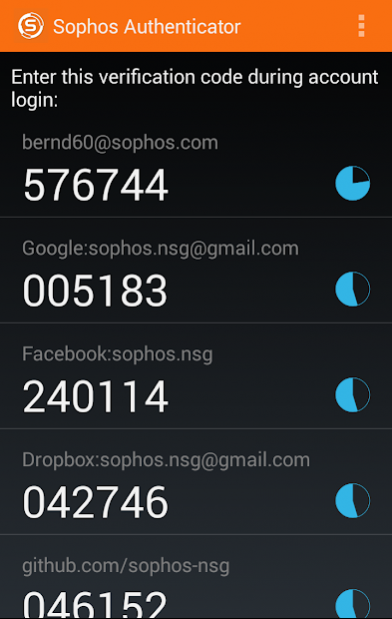
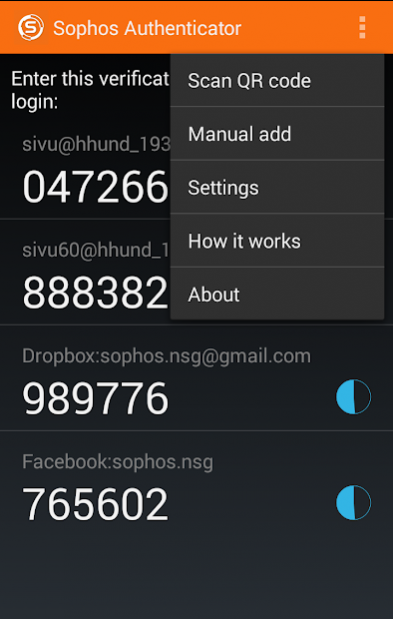
Sophos Authenticator is a simple and intuitive application that provides multi-factor authentication on your mobile device. It generates both time-based and event-based one-time passwords (OTP) according to RFC 6238 and RFC 4226.
Once configured, 2-step authentication protects your account by requiring both your password and an additional code, thus adding an extra layer of security. The app will generate these codes for you in a convenient way, directly on your smartphone or tablet, without the need for Internet connection. Sophos Authenticator does not only operate with a Sophos account, but also with accounts from Google, Dropbox, Facebook, Github and all the other providers who implement authentication in this standardized way.
Features:
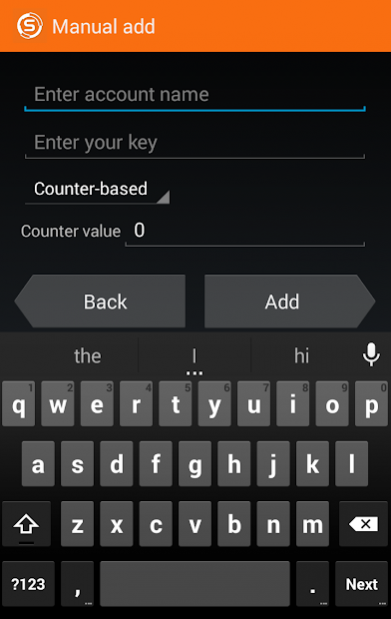
- Can generate both time-based (TOTP) and counter-based (HOTP) codes
- SHA-1, SHA-256 and SHA-512 hash algorithm supported
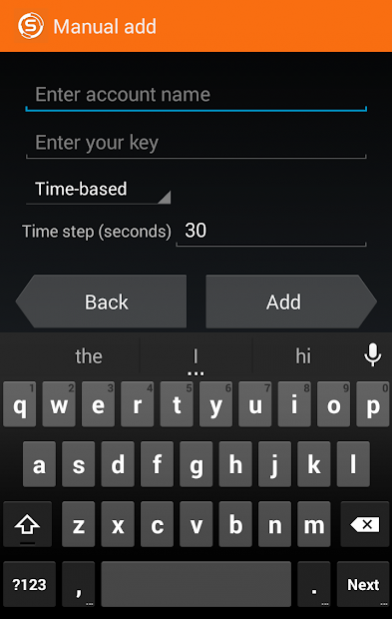
- Add an account easily by simply scanning a QR code with your device camera or by adding it manually
- Great flexibility: the time-step for TOTP accounts can be any number of seconds and is not limited to 30 seconds
- It's possible to specify the desired time step (TOTP case) or counter (HOTP case) when manually adding a new account
- Generated codes can be 6 to 8 digits wide
- No Internet/network connection needed, everything happens offline
- Copy any generated code to the clipboard for easy and fast access.
Support information
• Support forum: https://community.sophos.com/utm-firewall
By downloading and installing the Sophos Authenticator Application, you agree to be bound by the Sophos End User License Agreement ("EULA"): https://www.sophos.com/en-us/legal/sophos-end-user-license-agreement.aspx and acknowledge that Sophos processes personal data in accordance with the Sophos Privacy Notice: https://www.sophos.com/en-us/legal/sophos-group-privacy-notice.aspx
About Sophos Authenticator
The company that develops Sophos Authenticator is Sophos GmbH. The latest version released by its developer is 3.4.
To install Sophos Authenticator on your Android device, just click the green Continue To App button above to start the installation process. The app is listed on our website since 2021-04-12 and was downloaded 0 times. We have already checked if the download link is safe, however for your own protection we recommend that you scan the downloaded app with your antivirus. Your antivirus may detect the Sophos Authenticator as malware as malware if the download link to com.sophos.sophtoken is broken.
How to install Sophos Authenticator on your Android device:
- Click on the Continue To App button on our website. This will redirect you to Google Play.
- Once the Sophos Authenticator is shown in the Google Play listing of your Android device, you can start its download and installation. Tap on the Install button located below the search bar and to the right of the app icon.
- A pop-up window with the permissions required by Sophos Authenticator will be shown. Click on Accept to continue the process.
- Sophos Authenticator will be downloaded onto your device, displaying a progress. Once the download completes, the installation will start and you'll get a notification after the installation is finished.
Program Details
System requirements
Download information
Pricing
Version History
version 3.4
posted on 2021-04-12
Default language - en-US
- Add support for Android 10
- Don't allow screenshot or video of the OTP codes
- Bugfixes
version 3.2
posted on 2020-03-29
- Add support for Android 10
- Don't allow screenshot or video of the OTP codes
- Bugfixes
version 3.1
posted on 2020-03-25
Add support for SHA-256 and SHA-512 hashing algorithms
version 3.0
posted on 2016-04-04
Improved QR code scanning!,The app will use Mobile Vision by default, when available (Google Play services must be present on the device). If the old scanning method is preferred instead, then this can be configured in the Settings menu.
Disclaimer
External Download
We do not host Sophos Authenticator on our servers. We did not scan it for viruses, adware, spyware or other type of malware. This app is hosted by Galad and passed their terms and conditions to be listed there. We recommend caution when installing it.
The APK Download link for Sophos Authenticator is provided to you by apps112.com without any warranties, representations or guarantees of any kind, so access it at your own risk.
If you have questions regarding this particular app contact the publisher directly. For questions about the functionalities of apps112.com contact us.
